
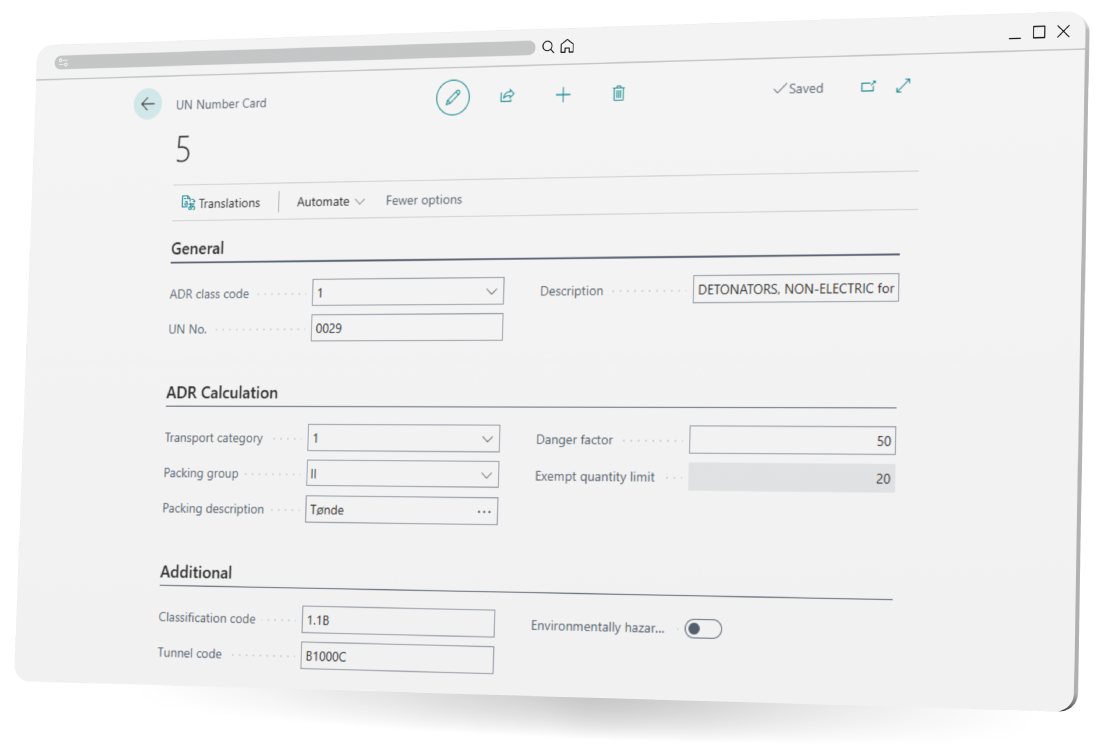

Business Central Dangerous Goods Mockup
Dangerous Goods logo

Dangerous Goods

Manage and ship hazardous goods safely and compliantly in Business Central

Dangerous Goods is an Extender for Shipment Connector. The solution lets you manage and ship hazardous materials safely and compliantly in Microsoft Dynamics 365 Business Central. It centralizes all Dangerous Goods data for items, including UN numbers, ADR classes, transport categories, and translations, and works seamlessly with the Shipment Connector to transfer the information to carriers.


Productsheet

Read our Dangerous Goods productsheet down below

Free trial

Download a free trial of Dangerous Goods

Order here

Quote or place an order for Shipment Connector with Dangerous Goods

Pricelist

Get an overview of our Shipment Connector packages and prices
Warehouse Scanner

Usage scenario

A Warehouse Operator prepares an order containing hazardous materials. They pick and pack the items, then navigate to the Waybill lines and finds the Dangerous Goods field.

The operator can automatically generate all required dangerous goods lines or select specific items manually. Once completed, the shipment includes all necessary hazardous material information and ADR documentation, ready to be sent through the carrier.

This workflow ensures compliance with international regulations, prevents errors, and streamlines daily shipping operations involving hazardous goods.

Added value

UN Numbers

Define hazardous material classifications for each item.

Translations

Support multiple languages for international shipments.

Transport Categories

Assess the hazard level of each item for compliant shipping.

Item Card Integration

Link dangerous goods data directly to items in Business Central.

Shipment Connector Integration

Automatically include all dangerous goods information in shipments and generate required ADR documentation via the multi-carrier platform.

Handling Dangerous Goods in Business Central

With this solution, Business Central can now store and manage hazardous material classifications, automate compliant shipping documentation, provide instant validation to prevent errors, ensure proper labeling and packaging, and adapt to carrier-specific requirements for seamless transportation.

Shipmondo Partner logo

What you can manage in Business Central

  • UN numbers

  • ADR classifications

  • Transport categories

  • Exemption limits

  • Required shipping documents

All from one central location inside Business Central.

By integrating Dangerous Goods management directly into Microsoft Dynamics 365 Business Central, companies can simplify logistics, minimize risks, and ensure smooth global trade operations.

Dangerous Goods mockup

FAQ

Dangerous Goods Extender is an addition to Shipment Connector that allows hazardous materials to be managed and shipped in Microsoft Dynamics 365 Business Central. It centralizes all dangerous goods data for items, including UN numbers, ADR classes, transport categories, and translations.

When preparing a shipment containing hazardous materials, a warehouse operator can pick and pack items, then access the Dangerous Goods field in the waybill lines. The operator can automatically generate required dangerous goods lines or select items manually. This ensures that shipments include all necessary hazardous material information and ADR documentation.

In Business Central, the Dangerous Goods Extender allows management of:

  • UN numbers

  • ADR classifications

  • Transport categories

  • Exemption limits

  • Required shipping documents

All information is centralized in Business Central and can be linked directly to items.

All hazardous goods information is automatically included in shipments through the Shipment Connector. ADR documentation required for shipment is generated via the multi-carrier platform.

  • UN Numbers: Define hazardous material classifications for each item.

  • Translations: Support multiple languages for international shipments.

  • Transport Categories: Assess hazard levels for compliant shipping.

  • Item Card Integration: Link dangerous goods data directly to items in Business Central.

  • Shipment Connector Integration: Automatically include hazardous goods data and generate ADR documentation for shipments.

All Dangerous Goods information is stored centrally in Business Central, directly linked to the relevant items and accessible for shipment preparation.

Yes. The solution supports multiple languages and integrates with multi-carrier shipping platforms, allowing proper documentation and compliance for international transport.

By integrating hazardous goods management directly into Business Central, operators can complete shipments efficiently, with reduced errors and all required documentation automatically included.

Jesper XtensionIT
Jesper Lohse Andreasen
Consultant
We are an innovative software developer focused on integrations for Business Central. Our solutions, built on Microsoft Dynamics 365 Business Central enhances our customers needs and optimizes their business processes in Business Central.
+ 45 32 42 66 34 info@xtensionit.com
© XtensionIT A/S 2026
CVR 35480730